Coding games for kids: learn by building one
The fastest way to get a child coding is to let them build a game they actually want to play. Motivation solves the hardest problem in learning to code — sticking with it long enough to get good. Here's how to use games as the on-ramp, on-screen and off.
Good first game projects
- A dodge-the-obstacle game — Teaches movement, collisions, and score — the core of most games — in one small build.
- A quiz or trivia game — Great for logic and "if this, then that" thinking, and easy to fill with topics your child loves.
- A maze or catch game — Introduces goals, win/lose states, and levels — a natural way to meet loops and conditions.
The best coding games for kids, compared
Five options parents actually shortlist, and what each one is genuinely good at. There is no single winner — the right pick depends on whether your child wants to learn blocks, follow a course, or make a thing of their own.
| Tool | Ages | Free or paid | What it actually teaches |
|---|---|---|---|
| Scratch | 8–12 | Free | Block-based programming: loops, events and conditions, by dragging blocks. The classic first step, and still the best one for "how does a program run?" |
| Code.org | 7–12 | Free | Guided puzzle courses with familiar characters. Strongest for structure — a child who needs a path rather than a blank canvas. |
| Tynker | 7–12 | Free tier, paid plans | A blocks-to-text ladder with game and Minecraft-style projects. Good bridge if your child has outgrown Scratch but is not ready for typed code. |
| Minecraft Education | 8–12 | Paid (school or subscription) | Coding inside a world they already love — agents and commands that change the game. Motivation is the point here. |
| Luchi | 5–17 | $5 for the first 7 days, then $99/month ($49 founding) | Building a real playable game by telling Luchi what to make, then checking and fixing what she got wrong — plus explaining the result to a parent in the child's own words. |
How to pick one this week
If your child has never coded, start with Scratch or Code.org — free, no account friction, and both give a working thing in the first sitting. If they have already done a few Scratch projects and are bored, the next step is not a harder language; it is a bigger project. That is where a game they actually want to play, built with an AI, keeps them going long past the point a tutorial would have lost them.
On-screen and off
You don't need a device for all of it. "Unplugged" games — writing step-by-step instructions for a parent to follow literally, or drawing a game's rules on paper — teach the same computational thinking and cost nothing. When you do go on-screen, directing an AI lets a child go from idea to playable in one sitting, which keeps the momentum a half-finished tutorial kills.
Why a game is the right first project
Ask a child to build a to-do list app and you get compliance. Ask them to build a game and you get a designer — someone with opinions about how fast the player should move, what happens when you lose, and whether the enemies are too easy. Those opinions are the engine of the whole thing, because they generate the reason to solve every problem that follows.
Games also fail loudly and immediately, which is a gift when you're learning. A spreadsheet that's subtly wrong stays wrong for weeks. A game where the player falls through the floor tells you instantly, and fixing it is satisfying rather than tedious. That tight loop — change something, see the result, change it again — is the single best condition for learning anything technical.
And a game is finishable. A child can carry a playable thing to a parent, a sibling, or a friend and watch someone else react to something they made. That moment does more for persistence than any amount of encouragement from an adult.
Your child's first game, start to finish
- 1. Pick something small enough to finish today One screen, one goal, one way to lose. "Catch the falling apples in a basket" is a real game. "An open-world adventure with a story" is a project that will be abandoned by Thursday. Ambition is fine later; the first one needs to reach the end.
- 2. Describe it out loud before anything is built What do you control? What's trying to stop you? How do you win, how do you lose, and what does the screen look like? Getting this out of a child's head and into sentences is the actual computational thinking — and it's the part that transfers to everything else.
- 3. Build the boring core first Something that moves when you press a key. That's it. Graphics, sound, levels and menus all come later, and every one of them is more fun to add to a thing that already works than to a thing that doesn't.
- 4. Play it, break it, fix it Kids are extremely good at this part. They will immediately try to walk off the edge of the screen. Let them find the bugs, and make the fixing the main event rather than an annoyance — because debugging is where the thinking actually happens.
- 5. Add one thing that makes it theirs A score, a silly sound, a sprite that looks like the family cat. This is what turns "I did a tutorial" into "I made a game", and the difference in how the child talks about it afterwards is not subtle.
- 6. Show it to someone A parent, a sibling, a grandparent on a video call. Watching another person play the thing you made is the payoff that makes a child want a second project.
What they're actually learning while making a game
Underneath the sprites, a simple game contains most of the ideas a beginner programming course would cover. A loop runs every frame. A conditional decides whether the player hit something. A variable holds the score. Coordinates are geometry with a purpose. And the whole thing is a state machine — playing, paused, game over — which is a genuinely advanced idea that children absorb without noticing because it's obvious in context.
They're also learning the meta-skill that outlasts every language: breaking a fuzzy want into precise, ordered steps, then checking reality against intention. Whether they eventually write Python, direct an AI, or do something neither of us has heard of yet, that's the part that carries.
Questions parents ask
- What's the best coding game for kids to start with?
- Less important than picking one small enough to finish. A one-screen catch or dodge game hits every core concept — movement, collision, score, win and lose — and can be done in a sitting, which matters more than the theme.
- Do they need to know how to code first?
- No. That's the older sequence. With block-based tools or an AI to direct, a child can start from the game they want and meet the concepts as they need them — which is both more motivating and, in practice, faster.
- How long should a first game take?
- One or two sittings for something playable. If it's dragging past that, the scope was too big — cut a feature rather than pushing through, and add it back to version two.
- Is making games with AI still really learning?
- It is if the child is deciding what to build, testing it, and fixing what's wrong. That's the thinking part. The risk isn't AI writing the code; it's the child never looking at what came back — which is a question of how the session is structured.
- My child wants to make Minecraft. What do I say?
- Say yes, then find the smallest piece of it. "A block you can place and remove" is a real first version of that dream, and it's achievable. Shrinking the goal without killing the ambition is the most useful thing a parent can do here.
Where a game project fits in US grade bands
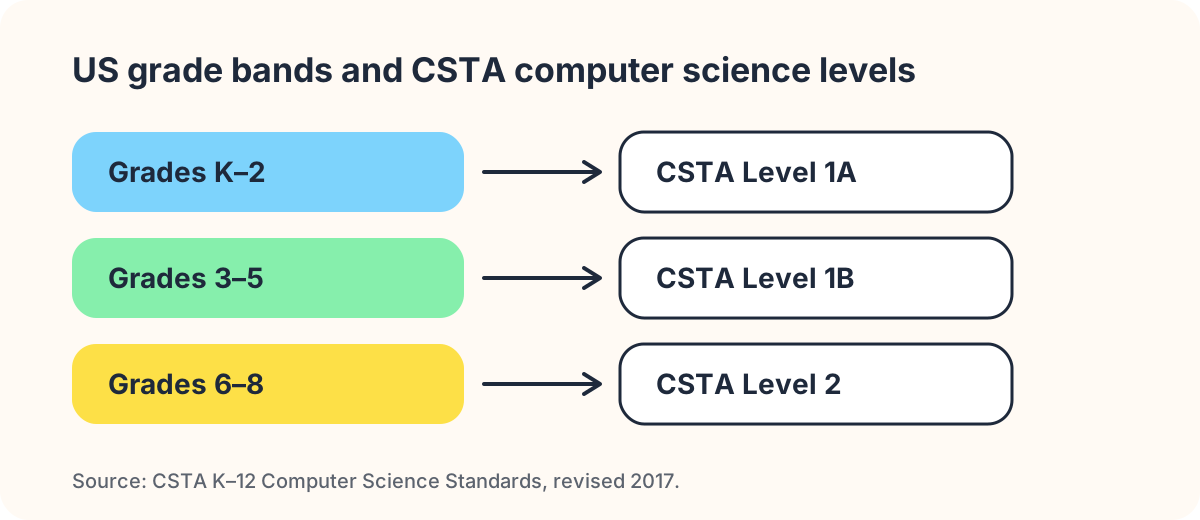
School-age kids span a lot of American school — kindergarten through high school. The CSTA K–12 Computer Science Standards, the framework most US computer science curricula are written against, split that span at exactly the point where building a game changes character. Level 1A runs kindergarten through grade 2, Level 1B covers grades 3–5, and Level 2 begins in grade 6.
In K–2 (Level 1A), a "coding game" is really cause and effect: press this, that happens. Your child is learning that a sequence of instructions produces a predictable result. A finished project is two or three rules, and that is genuinely enough. Resist the urge to make it bigger.
Grades 3–5 (Level 1B) is where a game project earns its keep. Level 1B asks students to compare algorithms, break a problem into parts, and test and refine a program. That is a plain description of what happens when a nine-year-old builds a dodge-the-obstacle game, discovers the obstacles spawn too fast to survive, and changes one number to find out. The standard is not asking for anything your kitchen table cannot supply.
From grade 6 (Level 2), the same game wants a rewrite rather than a patch: variables get real names, the code gets structure, and your child starts caring how somebody else would read it. If your middle-schooler is suddenly bored by the game they were proud of in fourth grade, that is why — and rebuilding it properly is a better project than starting something new.
Your own state’s standards are the ones that actually count, and they are public. Several states publish CSTA’s framework directly to their educators — Washington’s Office of Superintendent of Public Instruction and New Mexico’s Public Education Department both host the revised 2017 standards. Search your state department of education site for "computer science standards" and you will find the grade-band language your child’s teacher is working from.
Fitting one game into the US school year
A game project fails more often from bad timing than from bad ideas. The American school calendar has a shape, and a project that ignores it gets abandoned in week two.
August and September, the back-to-school weeks, are the worst possible time to start something ambitious. New teacher, new routine, new bedtime. Start something a child can finish in one sitting instead — a two-rule game — and let the win be the point.
October through early December is the long, uninterrupted stretch, and it is the best window of the year for a real project. A game with a score, a losing condition, and one thing the child invented is a four-to-six-week arc at one evening a week. That pace matters more than the total hours.
Winter break is a trap in both directions. Two unstructured weeks look like an opportunity, but a child who codes for six hours on December 27th and never touches it again has learned that this is a holiday activity. One short session every few days beats a marathon.
Spring break and the run-up to state testing in March and April is a low-energy period; treat it as maintenance. Then summer, June through August, is the only stretch long enough for the project a child talks about for years — the one that gets rebuilt twice because the first version was wrong.
District calendars differ, sometimes a lot, and year-round and balanced-calendar schools break this rhythm entirely. Take the shape, not the dates.
COPPA: what has to happen before your child signs up
- The age screen comes first — Under the Children’s Online Privacy Protection Act (15 U.S.C. 6501–6505) and the FTC’s Rule at 16 CFR Part 312, a service directed to children, or one that knows it has users under 13, cannot collect personal information from them without a parent’s involvement. In practice the first thing a compliant coding game asks is how old the user is — before it asks for anything else. A sign-up flow that goes straight to "enter your email" is telling you something.
- Verifiable parental consent, not a checkbox — The law says verifiable — the operator has to make a reasonable effort to confirm an actual parent consented, not just tick a box saying they are one. That is why a real kids’ product makes you, the adult, create the account and then attach the child to it. The extra two minutes is the compliance, not friction someone forgot to remove.
- You can see it, and you can delete it — COPPA gives you the right to review what has been collected from your child and to have it deleted, and to withdraw consent and stop further collection. Before your child builds anything worth keeping, find those three controls in the product. If you cannot find them in five minutes of looking, assume they are not there.
- The rules got stricter in 2026 — The FTC published amendments to the COPPA Rule in the Federal Register on 22 April 2025, effective 23 June 2025, with full compliance required by 22 April 2026. Biometric identifiers now count as personal information, sharing a child’s data with third parties for anything not integral to the service needs its own separate consent, and operators must keep a written data-retention policy. A US parent shopping for a coding game in the 2026–27 school year is shopping in a stricter market than a parent was two years ago — which is good news, and worth using.
More questions US parents ask
- How do I check whether a coding game is actually COPPA-compliant?
- Open the privacy policy and use your browser’s find function for "children" or "COPPA". A compliant US operator has a specific section, not a sentence. Read it for three things: how they obtain verifiable parental consent, how a parent requests deletion, and how long they keep the data. Then test the sign-up flow yourself — if it never asks an age and never involves you, the policy is decoration. You can also email them the question directly; an operator subject to the Rule has to have an answer ready.
- Does building a game at home count toward what school teaches?
- It maps cleanly onto CSTA Level 1B for grades 3–5 — decomposing a problem, comparing approaches, testing and refining a program — but no, it does not count for credit. What it does is make the class easier, because your child arrives having already done the thing the standard describes. If you want the specific language, pull up your state’s computer science standards and read the grade-band your child is in; it takes ten minutes and it tells you exactly what the teacher is aiming at.
- What should a coding game for kids cost in the US?
- A great deal of it is free. Scratch, from MIT, costs nothing. Paid kids’ coding and AI products in the US mostly land between roughly $8 and $30 per month per child, with annual plans discounting that. Luchi Family is one plan for the whole family: $99 a month ($49 for founding families), every kid included, with your first 7 days for $5 — cancel before it renews. Before you pay for anything, spend a free month on one tool and see whether your child returns to it unprompted — that is the only feature that matters.
- My child’s school district banned AI. Can they still do this at home?
- Almost certainly, and the two are different questions. A district AI policy governs school-issued devices, school accounts and schoolwork — it is about academic integrity and student-records privacy, not about what you decide at home. Read the actual policy rather than the email about it; most of them turn out to restrict AI on assignments rather than forbid the technology. Then tell your child plainly which rules apply where, because a nine-year-old will not draw that line on their own.
Build a real game this week
Luchi missions walk kids from idea to a game they can play and share — directing Luchi the whole way.
Part of the series: Coding for kids
Related guides in this series
- Coding with AI for kids — The new way kids build real games and apps — by telling an AI what to make and checking what comes back. What “coding with AI” actually means, and why it’s the skill that lasts.
- The best coding language for kids — Scratch, Python, or something else? A straight answer by age — and why the first “language” that matters now is plain English to an AI.