Is your child actually learning from AI? How to tell
Fluent output is not learning. The real test is what your child can do when the app is closed: explain it back, direct it instead of obeying it, catch it being wrong. Here are the signs of real learning, the signs the tool did the thinking, and a five-point checklist you can run on any AI app tonight.
The question underneath the question
Most AI apps are very good at producing work that looks like learning. A fluent paragraph, a working program, a correct answer — the output arrives polished, and it is genuinely hard to tell from the outside whether your child understood any of it. That is not a flaw in your judgement. The output was made to look like that, because a tool that looks effective gets kept.
So the question to ask is not "did my child produce something with the AI?" — they probably did, and it was probably good. The question is "who did the thinking?" A child can hand the same homework to an AI and come away with nothing, or use it to get unstuck and come away able to do that problem cold. The work looks identical on the page. The difference shows up later, and it is measurable with the five checks below.
What your kid is doing on AI: four checks that take under a minute each
Three signs of real learning
- They can explain it back — The explain-back test is the entire quality gate, and it costs thirty seconds. Close the app, pick one thing from the session, and ask how it works or why the answer is right. A child who can say it in their own words learned it. A child who says "the AI just told me" collected an output. Do it warmly and routinely, or it reads as an accusation and you get a shrug.
- They ask for more control — A child who is actually learning stops being a passenger. They change the rule on the game they built. They ask to try the next problem themselves before getting help. They say "let me do it." Wanting the controls is what understanding looks like from the outside — a child who has learned something has opinions about how it should be done, and those opinions leak out as requests.
- They catch the AI being wrong — The strongest sign there is, because it is the one a child cannot fake and cannot produce without knowing more than the machine. If your child has ever said "wait, that's not right" — about a fact, an answer, a rule in the game the AI just built — they have crossed from consuming the output to evaluating it. That only happens when there is real understanding on the child's side of the table.
Three signs the tool did the thinking
- Fluent output, empty explanation — The work is good and the child cannot say how it was made. "It just wrote it." Fluency is the product's achievement, not the child's — and the more polished the output, the less the child had to do. If nothing can be explained back, nothing was learned, however good the paragraph looks on the fridge.
- Nothing ever breaks — A session with no friction, no errors and no fixing is a session where the tool made every decision. The struggle is not a bug in learning; it is most of learning. A child who never watches their own idea fail and get repaired is watching television with extra steps, however interactive it looks.
- The progress only exists inside the app — The scoreboard goes up, the streaks stay alive, and nothing transfers. The test is Monday morning: can they do the thing again without the app, on homework, on paper, out loud? Progress that vanishes the moment the app closes was the app's progress, not your child's.
The five-point checklist: run it on any AI app tonight
Five checks, fifteen minutes, no special knowledge — and they work on any AI product your child touches, ours or anyone else's. Each one compares what the app claims with what your child can do.
| Check | How to run it | A pass looks like |
|---|---|---|
| 1. The explain-back test | Close the app. Ask your child to explain one thing from the session — how the game works, why that answer was right. | They say it in their own words and can handle one follow-up question. A blank look or "it just did it" is a fail. |
| 2. The without-it check | Ask them to do one similar problem — or change one rule of the thing they built — with the app closed. | They attempt it, even imperfectly. Refusal before trying is the dependence signal, not a lack of talent. |
| 3. The control check | Watch ten minutes of a session. Count who decides the next move: your child or the app. | Your child directs — asks, changes, retries. A child who only answers the app's prompts is the one being used. |
| 4. The error test | Ask the AI something in your child's area of expertise — their game, their sport, their book series. | Your child spots the mistake. Catching a confident wrong answer is proof of understanding no dashboard can fake. |
| 5. The Monday-morning check | A week later, ask about it again: what they made, what went wrong, what they would change. | It is still there, in their words, a week on. If it is gone, it was the app's progress, not theirs. |
Where Luchi stands — shown, not asserted
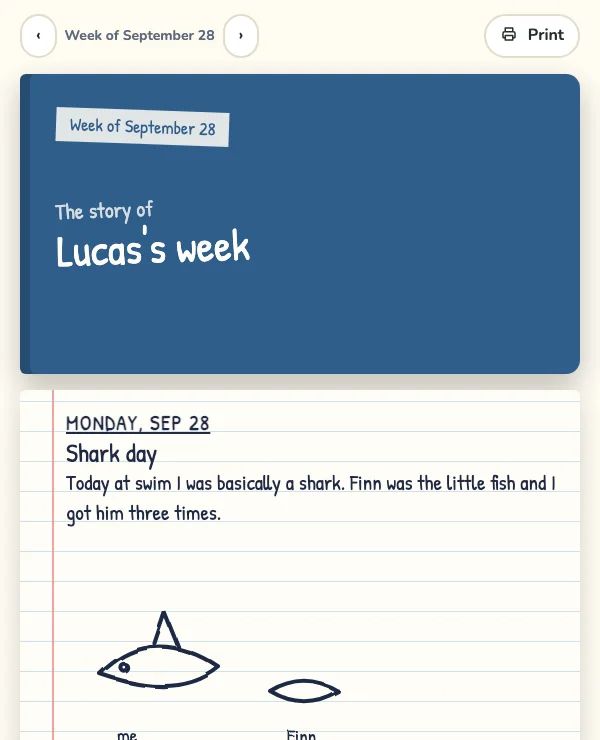
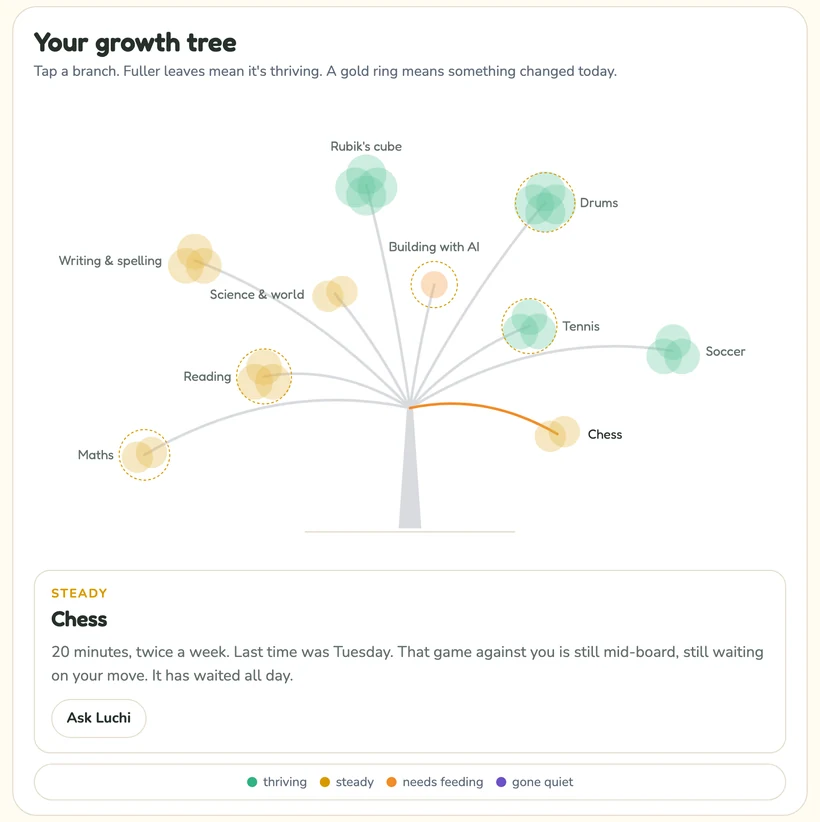
We built Luchi to pass this checklist, so run it on us. Kids build real games by describing what they want, then test and fix what comes back — the friction is the design. Homework gets hints first and a worked example only after two of them, never the answer unless you turn that on. And the parent-facing half is a record, not a scoreboard: what your child did, written in their own words, one day per page, with each subject's real standing on the tree beside it.
The honest claim is not that our kid learns more than yours. It is that the thing a parent receives from Luchi is the same evidence the checklist above asks for — the child's own words about their own work — so checks one and five can be run straight from what we send you, with no transcript to request and no log to read.
How Luchi teaches — the method, and the research under each part
The parent-facing output
Real screens from the Luchi Family app — the record you receive, not the chat your child has.
Questions parents ask
- What age does this checklist work for?
- The explain-back test works as soon as a child can talk about what they did — roughly from six up, and it stays the single best check through secondary school. The control and error checks land best from about eight, when children can hold the idea that a confident voice might be wrong. None of the five checks needs any technical knowledge from you.
- Is this not just what a progress dashboard shows?
- No, and the difference is the whole point. A dashboard measures activity inside the app: questions answered, minutes spent, levels passed. The checklist tests transfer — what survives outside the app, a week later, in your child's own words. A child can max out a dashboard and fail all five checks, and a child can fail a quiz and pass the explain-back cold.
- My child hates being quizzed. How do I run these without it becoming a test?
- Ask about the work, not for the work. "Show me the bit you're proudest of and tell me how it works" flatters rather than interrogates, and it extracts the same signal as a pop quiz. Ask on ordinary days, not only when you are worried — a question that only appears when something is wrong teaches a child that answering it is risky.
- Does Luchi pass its own checklist?
- That is exactly the right question to ask, which is why this page answers it with screenshots instead of adjectives. The friction is designed in — hints before answers, builds that need testing and fixing — and the record you receive is your child's own words, so checks one and five can be run from what we send you. Run the other three on a real session and see.
- How long does the checklist take?
- About fifteen minutes spread over two weeks. The explain-back, control and error checks are minutes on one evening; the without-it check rides along the next time homework is done; the Monday-morning check is one question a week later. None of them needs an install, an account, or anything from the vendor.
Run the checklist on Luchi
Luchi is built for this test: kids build real games and explain what they made, homework gets hints instead of answers, and you get a weekly note written from what actually happened — in your child's own words.
Part of the series: How to end the daily homework battle
Related guides in this series
- Teaching kids to start homework without reminders — Independence is a prompt you remove on purpose, not a trait you wait for. A five-rung ladder from "you say it daily" to "you only ask afterwards", with how long each rung takes.
- Seven practical homework focus strategies — Seven things that help once they have started, in the order worth trying them — plus an honest table of which rest on solid evidence and which do not.
- What parents should know about AI homework helpers — Unguarded AI help measurably lowered later unaided test scores; guardrails removed the harm. What is known, what is not, and five questions to ask any product.
- AI homework help for kids — Where the line sits between help and doing it for them, subject by subject — plus a five-step routine for one hard question and five questions to ask any homework product.
- Is my kid cheating with AI? — Why AI detectors are not reliable enough to accuse a child on, the ninety-second check that is, and what to do about each of the four things you are likely to find.
- The after-school hour, without the nagging — The fight is about the forty minutes before homework. A five-block plan, the four traps that turn a routine back into nagging, and the research that makes it work.